线程入门
创建线程
using system;
using system.Threading;

ThreadStart entry = new ThreadStart(CalcSum);
Thread workThread = new Thread(entry);
//or
Thread workThread = new Thread(new ThreadStart(CalcSum));

//Method:
static void CalcSum()
{
     //do somethings.
}
Thread类几个重要方法
Thread类用于创建线程,ThreadPool类用于管理线程池。
Thread类中几个重要的方法:
1. Start():启动线程;
2. Sleep(int):静态方法,暂停当前线程指定的毫秒数;
3. Abort():通常使用该方法来终止一个线程;
4. Suspend():该方法并不终止未完成的线程,它仅仅挂起线程,以后还可恢复;
5. Resume():恢复被Suspend()方法挂起的线程的执行。
Thread.ThreadState属性
Thread.ThreadState 在各种情况下的取值如下:
1. Aborted:线程已停止
2. AbortRequested:线程的Thread.Abort()方法已被调用,但是线程还未停止
3. Background:线程在后台执行,与属性Thread.IsBackground有关(前台所有进程)
4. Running:线程正在正常运行
5. Stopped:线程已经被停止
6. StopRequested:线程正在被要求停止
7. Suspended:线程已经被挂起(此状态下,可以通过调用Resume()方法重新运行)
8. SuspendRequested:线程正在要求被挂起,但是未来得及响应
9. Unstarted:未调用Thread.Start()开始线程的运行
10. WaitSleepJoin:线程因为调用了Wait(),Sleep()或Join()等方法处于封锁状态
设定线程优先级
优先级由高到低分别是Highest,AboveNormal,Normal,BelowNormal,Lowest。默认为ThreadPriority.Normal。
//示例:设定优先级为最低
myThread.Priority=ThreadPriority.Lowest;
线程的同步和通讯——生产者和消费者
假设这样一种情况,两个线程同时维护一个队列,如果一个线程对队列中添加元素,而另外一个线程从队列中取用元素,那么我们称添加元素的线程为生产者,称取用元素的线程为消费者。
lock关键字
lock 关键字解决多个线程同时执行一个函数,导致数据的混乱,产生不可预料的结果的问题。
lock 关键字将一段代码定义为互斥段(critical section)。互斥段在一个时刻内只允许一个线程进入执行,而其他线程必须等待。
//定义如下:
lock(expression) statement_block

//expression代表你希望跟踪的对象,通常是对象引用。一般地,保护一个类的实例,可以使用this;保护一个静态变量(如互斥代码段在一个静态方法内部),一般使用类名就可以。
//statement_block就是互斥段的代码,这段代码在一个时刻内只可能被一个线程执行。
Monitor类(System.Threading)
Monitor提供了使线程共享资源的方案。
Monitor类可以锁定一个对象,一个线程只有得到这把锁才可以对该对象进行操作。
......
Queue oQueue=new Queue();
......
Monitor.Enter(oQueue);
......//现在oQueue对象只能被当前线程操纵了
Monitor.Exit(oQueue);//释放锁

//为了保证线程最终都能释放锁,你可以把Monitor.Exit()方法写在try-catch-finally结构中的finally代码块里。
//当拥有对象锁的线程准备释放锁时,它使用Monitor.Pulse()方法通知等待队列中的第一个线程。
Monitor.Wait()和Monitor.Pulse()
1. Wait()就是交出锁的使用权,使线程处于阻塞状态,直到再次获得锁的使用权。
2. 当前线程调用Pulse()向队列中的下一个线程发出锁的信号。接收到脉冲后,等待线程就被移动到就绪队列中。
在调用 Pulse 的线程释放锁后,就绪队列中的下一个线程(不一定是接收到脉冲的线程)将获得该锁。pulse()并不会使当前线程释放锁。
实例:开辟一线程实现异步导出Excel
环境介绍及实例简述
环境介绍:
开发语言》C#;
开发工具》Visual studio 2015;
Asp.Net MVC Version》5.2.3;
.Net Version》6.1.3;
NIPO version》2.2.1;
实例简述:
由于导出的Excel文件比较大,非常耗时,为了不影响对界面的其他操作,需要采用异步的方式进行导出。
具体实现方法就是后台开辟一个线程将Excel导出到指定目录,然后提供下载。
实现思路及准备工作
思路:
通过线程实现异步导出操作;
通过NIPO组件将数据存到Excel文件中。
准备工作:
1.下载NPOI组件,http://npoi.codeplex.com/
2.orcleHelper.dll
实例代码
UserController.cs
using Project.BLL;
using Project.Class;
using Project.Interface;
using Project.ViewModel;
using System;
using System.Collections.Generic;
using System.IO;
using System.Web.Mvc;
using System.Web.Script.Serialization;

namespace Project.UI
{
    /// <summary>
    /// 文件信息类
    /// </summary>
    public class FileInfoClass
    {
        public int count { set; get; }
        public IList<string> d_fileList { set; get; }
    }
    /// <summary>
    /// 用户控制器
    /// </summary>
    public class UserController : BaseController
    {
        //用户接口
        private IUserBLL iuser = new UserBLL();
        //返回信息
        private ReturnInfo returninfo = new ReturnInfo();

        /// <summary>
        /// 导出用户数据,返回文件列表
        /// </summary>
        public ActionResult UserInfoExportExcel()
        {
            //搜索条件Model对象
            SearchUserModel searchUserModel = new SearchUserModel();
            //1.获取数据(具体如何获取数据,这里没有陈述)
            List<UserViewModel> list = iuser.GetUserInfo(searchUserModel, ref returninfo) as List<UserViewModel>;

            //2.调用方法,导出Excel
            //生成文件名称(改文件名称)
            var fileName = string.Format("{0}用户信息表.xls", DateTime.Now.ToString("yyyyMMddHHssmm"));
            //判断目录是否存在(该目录名称)
            if (!Directory.Exists(Server.MapPath("~/Downloads/用户信息")))
            {
                Directory.CreateDirectory(Server.MapPath("~/Downloads/用户信息"));
            }
            //将生成的文件保存到服务器临时文件夹中
            string fullPath = Path.Combine(Server.MapPath("~/Downloads/用户信息"), fileName);
            //表头
            Dictionary<string, string> tableHeader = new Dictionary<string, string>
            {
                { "user_id","用户编号" },
                { "username","用户名" },
                { "sex","性别" },
                { "age","年龄" },
                { "tel","联系电话"},
                { "email","邮箱"},
                { "user_type", "用户类型" },
                { "nickname", "用户昵称" }
            };
            //导出到Excel。(Global.asax.cs)
            MvcApplication._VehicleQueueT.Enqueue(new Classes.DataExportPara { excelPath=fullPath, sheetName = "用户信息", tableHeard= tableHeader, list =list});

            //获取路径
            string path = Server.MapPath("~/Downloads/用户信息");
            //获取所有xls文件路径
            IList<string> fileList = GetAllFileName(path);
            FileInfoClass f_info = new FileInfoClass();
            f_info.count = fileList.Count;
            f_info.d_fileList = fileList;

            //返回文件列表
            return new ContentResult
            {
                Content = new JavaScriptSerializer { MaxJsonLength = Int32.MaxValue }.Serialize(f_info),
                ContentType = "application/json"
            };
        }
        /// <summary>
        /// 仅获取文件列表
        /// </summary>
        /// <returns></returns>
        public ActionResult GetFileLists()
        {
            if (!Directory.Exists(Server.MapPath("~/Downloads/用户信息")))
            {
                Directory.CreateDirectory(Server.MapPath("~/Downloads/用户信息"));
            }
            //路径
            string path = Server.MapPath("~/Downloads/用户信息");
            //
            IList<string> fileList = GetAllFileName(path);

            FileInfoClass f_info = new FileInfoClass();
            f_info.count = fileList.Count;
            f_info.d_fileList = fileList;
            return new ContentResult
            {
                Content = new JavaScriptSerializer { MaxJsonLength = Int32.MaxValue }.Serialize(f_info),
                ContentType = "application/json"
            };
        }
        /// <summary>
        /// 删除文件
        /// </summary>
        /// <param name="fileName"></param>
        /// <returns></returns>
        public ActionResult DeleteFile(string fileName)
        {
            string result = "";
            //路径
            string filePath = Server.MapPath("~/Downloads/用户信息/"+fileName);
            if (!Directory.Exists(Server.MapPath("~/Downloads/已删除文件目录")))
            {
                Directory.CreateDirectory(Server.MapPath("~/Downloads/已删除文件目录"));
            }
            string deletedFilePath = Server.MapPath("~/Downloads/已删除文件目录/"+fileName);
            try
            {
                //System.IO.File.Delete(filePath);
                //移动文件到"已删除文件目录"中
                FileInfo file = new FileInfo(filePath);
                file.MoveTo(deletedFilePath);
                result += "成功删除文件";
            }
            catch (Exception)
            {
                result += "删除文件失败";
            }
            //返回操作结果
            return Json(result, JsonRequestBehavior.AllowGet);
        }
        /// <summary>
        /// 获取目录下的所有xls文件
        /// </summary>
        /// <param name="path"></param>
        /// <returns></returns>
        private IList<string> GetAllFileName(string path)
        {
            /*List<FileInfo> filelist = new List<FileInfo>();
            //if (System.IO.File.Exists(path+"\\*.xls"))
            var files = Directory.GetFiles(path, "*.xls");
            foreach (var file in files)
            {
                filelist.Add(new FileInfo(file));
            }*/
            IList<string> list = new List<string>();
            DirectoryInfo folder = new DirectoryInfo(path);
            foreach (FileInfo file in folder.GetFiles("*.xls"))
            {
                list.Add(file.Name);
            }
            return list;
        }
    }
}
Global.asax.cs
using System;
using System.Collections.Generic;
using System.Linq;
using System.Threading;
using System.Web;
using System.Web.Mvc;
using System.Web.Optimization;
using System.Web.Routing;
using Project.Classes;

namespace GpsProject.UI
{
    public class MvcApplication : System.Web.HttpApplication
    {
        //数据导出队列
        public static Queue<DataExportPara> _VehicleQueueT = new Queue<DataExportPara>();

        protected void Application_Start()
        {
            AreaRegistration.RegisterAllAreas();
            FilterConfig.RegisterGlobalFilters(GlobalFilters.Filters);
            RouteConfig.RegisterRoutes(RouteTable.Routes);
            BundleConfig.RegisterBundles(BundleTable.Bundles);

            OutputVehicleExcel();//注册信息导出方法
        }

        /// <summary>
        /// 导出信息
        /// </summary>
        public static void OutputVehicleExcel()
        {
            DataExportPara exportPara = null;
            ThreadPool.QueueUserWorkItem(o =>
            {
                while (true)
                {
                    if (_VehicleQueueT != null && _VehicleQueueT.Count > 0)
                    {
                        exportPara = _VehicleQueueT.Dequeue();
                        if (exportPara != null)
                        {
                            //调用方法
                            DataExport.ExportExcel(exportPara.excelPath, exportPara.sheetName, exportPara.tableHeard, exportPara.list);
                        }
                        else
                        {
                            Thread.Sleep(6000);
                        }
                    }
                    else
                    {
                        Thread.Sleep(6000);
                    }
                }
            });
        }
    }
}
DataExportPara.cs
using System.Collections;
using System.Collections.Generic;

namespace Project.Classes
{
    /// <summary>
    /// 数据导出para
    /// </summary>
    public class DataExportPara
    {
        /// <summary>
        /// 导出路径
        /// </summary>
        public string excelPath { get; set; }
        /// <summary>
        /// 数据列表
        /// </summary>
        public IList list { get; set; }
        /// <summary>
        /// 工作表名称
        /// </summary>
        public string sheetName { get; set; }
        /// <summary>
        /// 表头
        /// </summary>
        public Dictionary<string, string> tableHeard {get;set;}
    }
}
DataExport.cs
using GpsProject.Class;
using System.Collections;
using System.Collections.Generic;
using System.IO;

namespace Project.Classes
{
    /// <summary>
    /// 数据导出
    /// </summary>
    public class DataExport
    {
        /// <summary>
        /// 导出Excel到目录
        /// </summary>
        /// <param name="path"></param>
        /// <param name="sheetName"></param>
        /// <param name="tableHeard"></param>
        /// <param name="list"></param>
        public static void ExportExcel(string path, string sheetName, Dictionary<string, string> tableHeard, IList list)
        {
            using (var exportData = NPOIExcelHelper.ExportToExcelStream(list, sheetName, tableHeard))
            {
                //创建一个文件
                FileStream file = new FileStream(path, FileMode.Create, FileAccess.Write);
                exportData.WriteTo(file);
                file.Close();
            }
        }
    }
}
NPOIExcelHelper.cs
using System;
using System.Collections.Generic;
using System.IO;
using System.Linq;
using NPOI.SS.UserModel;
using System.Collections;

namespace Project.Class
{
    /// <summary>
    /// NPOI
    /// </summary>
    public class NPOIExcelHelper
    {
        /// <summary>
        /// 导出Excel到文件流
        /// </summary>
        /// <param name="dt"></param>
        /// <param name="sheetName"></param>
        /// <param name="tableHeard"></param>
        /// <returns>文件流</returns>
        public static MemoryStream ExportToExcelStream(IList lists, string sheetName, Dictionary<string, string> tableHeard)
        {
            //创建一个工作簿
            NPOI.HSSF.UserModel.HSSFWorkbook book = new NPOI.HSSF.UserModel.HSSFWorkbook();
            NPOI.SS.UserModel.ISheet sheet = book.CreateSheet(sheetName); //创建sheet

            //Excel表头
            NPOI.SS.UserModel.IRow row = sheet.CreateRow(0); //创建行

            ICellStyle style = book.CreateCellStyle(); //创建单元格
            style.Alignment = HorizontalAlignment.Center; //对齐方式
            style.VerticalAlignment = VerticalAlignment.Center;  //单元格居中对齐

            #region 设置表头
            List<string> headers = tableHeard.Keys.ToList();
            for (int i = 0; i < headers.Count; i++)
            {
                ICell cell = row.CreateCell(i);
                cell.CellStyle = style;
                cell.SetCellValue(tableHeard[headers[i]]);
            }
            /*for (int i = 0; i < dt.Columns.Count; i++)
            {
                ICell cell = row.CreateCell(i);
                cell.CellStyle = style;
                cell.SetCellValue(dt.Columns[i].ColumnName);
            }*/
            #endregion

            #region 填充数据
            int rowIndex = 1;// 从第二行开始赋值(第一行已设置为单元头)
            if (lists != null && lists.Count > 0)
            {
                foreach (var list in lists)
                {
                    IRow rowTemp = sheet.CreateRow(rowIndex);
                    for (int i = 0; i < headers.Count; i++)
                    {
                        string cellValue = ""; // 单元格的值
                        object properotyValue = null; // 属性的值
                        System.Reflection.PropertyInfo properotyInfo = null; // 属性的信息

                        if (headers[i].IndexOf(".") > 0)
                        {
                            // 3.1.1 解析子类属性(这里只解析1层子类,多层子类未处理)
                            string[] properotyArray = headers[i].Split(new string[] { "." }, StringSplitOptions.RemoveEmptyEntries);
                            string subClassName = properotyArray[0]; // '.'前面的为子类的名称
                            string subClassProperotyName = properotyArray[1]; // '.'后面的为子类的属性名称
                            System.Reflection.PropertyInfo subClassInfo = list.GetType().GetProperty(subClassName); // 获取子类的类型
                            if (subClassInfo != null)
                            {
                                // 3.1.2 获取子类的实例
                                var subClassEn = list.GetType().GetProperty(subClassName).GetValue(list, null);
                                // 3.1.3 根据属性名称获取子类里的属性类型
                                properotyInfo = subClassInfo.PropertyType.GetProperty(subClassProperotyName);
                                if (properotyInfo != null)
                                {
                                    properotyValue = properotyInfo.GetValue(subClassEn, null); // 获取子类属性的值
                                }
                            }
                        }
                        else
                        {
                            // 3.2 若不是子类的属性,直接根据属性名称获取对象对应的属性
                            properotyInfo = list.GetType().GetProperty(headers[i]);
                            if (properotyInfo != null)
                            {
                                properotyValue = properotyInfo.GetValue(list, null);
                            }
                        }

                        // 3.3 属性值经过转换赋值给单元格值
                        if (properotyValue != null)
                        {
                            cellValue = properotyValue.ToString();
                            // 3.3.1 对时间初始值赋值为空
                            if (cellValue.Trim() == "0001/1/1 0:00:00" || cellValue.Trim() == "0001/1/1 23:59:59")
                            {
                                cellValue = "";
                            }
                        }

                        // 3.4 填充到Excel的单元格里
                        ICell icellcontent = rowTemp.CreateCell(i);
                        //icellcontent.CellStyle = Getcellstyle(workbook, cellStylecontent, fontcontent, stylexls.默认);
                        icellcontent.SetCellValue(cellValue);
                    }
                    rowIndex++;
                    //达到65535行,跳出循环
                    if (rowIndex== 65535)
                    {
                        break;
                    }
                }
            }
            else
            {
                //导出空数据
                sheet.AddMergedRegion(new NPOI.SS.Util.CellRangeAddress(2, 2, 0, headers.Count - 1));
                IRow row2 = sheet.CreateRow(1);
                ICell icellkong = row2.CreateCell(0);
                //  icellkong.CellStyle = Getcellstyle(workbook, stylexls.默认);
                string str = "没有满足条件的数据可导出";
                icellkong.SetCellValue(str);
            }

            /* for (int i = 1; i <= dt.Rows.Count; i++)//遍历DataTable行
         {
             DataRow dataRow = dt.Rows[i - 1];
             row = sheet.CreateRow(i);//在工作表中添加一行

             for (int j = 0; j < dt.Columns.Count; j++)//遍历DataTable列
             {
                 ICell cell = row.CreateCell(j);//在行中添加一列
                 cell.SetCellValue(dataRow[j].ToString());//设置列的内容
             }
         }*/
            #endregion

            MemoryStream ms = new MemoryStream();
            book.Write(ms);
            return ms; //返回文件流
        }
    }
}
小结
在阅读别人的文章时,认真。
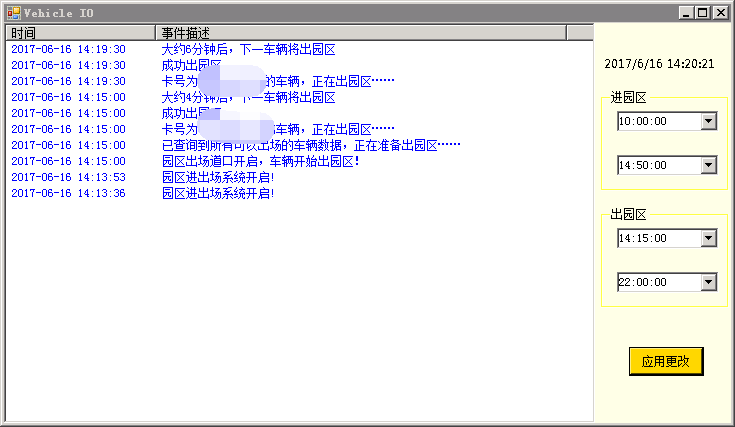
实例:利用线程监听模拟车辆进出智能化停车场
实例简述
实现效果
主要代码
Main.cs
private void Main_Load(object sender, EventArgs e)
{
    MessagePrint.UpdateEventInfo += new MessagePrint.ShowEventInfoHandler(UpdateRuntimeInfo);
    //设置开始、结束时间为00:00:00
    dateTimePicker_InStart.Text = ConfigInfoHelper.InStartRunTime;
    dateTimePicker_InEnd.Text = ConfigInfoHelper.InEndRunTime;
    dateTimePicker_OutStart.Text = ConfigInfoHelper.OutStartRunTime;
    dateTimePicker_OutEnd.Text = ConfigInfoHelper.OutEndRunTime;
    //获取默认时间
    BTModel.InStartRunTime = ConfigInfoHelper.InStartRunTime;
    BTModel.InEndRunTime = ConfigInfoHelper.InEndRunTime;
    BTModel.OutStartRunTime = ConfigInfoHelper.OutStartRunTime;
    BTModel.OutEndRunTime = ConfigInfoHelper.OutEndRunTime;
    vehicleio = new VehicleIO(BTModel);
    vehicleio.StartServer();
}
/// <summary>
/// 应用更改
/// </summary>
/// <param name="sender"></param>
/// <param name="e"></param>
private void ApplyChanged_Click(object sender, EventArgs e)
{
    //先停止监听线程
    vehicleio.StopServer();
    BTModel.InStartRunTime = dateTimePicker_InStart.Text;
    BTModel.InEndRunTime = dateTimePicker_InEnd.Text;
    BTModel.OutStartRunTime = dateTimePicker_OutStart.Text;
    BTModel.OutEndRunTime = dateTimePicker_OutEnd.Text;
    vehicleio = new VehicleIO(BTModel);
    vehicleio.StartServer();
}
VehicleIO.cs
private string InStartRunTime="";//园区进场开启时间
private string InEndRunTime = "";//园区进场结束时间
private string OutStartRunTime = "";//园区出场开启时间
private string OutEndRunTime = "";//园区出场结束时间
public VehicleIO(RunTimeModel btModel)
{
    InStartRunTime = btModel.InStartRunTime;
    InEndRunTime = btModel.InEndRunTime;
    OutStartRunTime = btModel.OutStartRunTime;
    OutEndRunTime = btModel.OutEndRunTime;
}
private Thread thread = null;
//初始值
private int sendLocationInterval = 3;
//new 车辆进出园区数据模型
private VehicleIOModel iomodel = new VehicleIOModel();
/// <summary>
/// 开始服务
/// </summary>
public void StartServer()
{
    ThreadStart iothread = new ThreadStart(working);
    thread = new Thread(iothread);
    thread.Start();
}
/// <summary>
/// 停止服务
/// </summary>
public void StopServer()
{
    if (thread != null && thread.IsAlive)
    {
        thread.Abort();
    }
}
/// <summary>
/// 挂起服务
/// </summary>
public void SuspendServer()
{
    if (thread.ThreadState == ThreadState.Running)
    {
        thread.Suspend();
    }
}
/// <summary>
/// 恢复服务
/// </summary>
public void ResumeServer()
{
    if (thread.ThreadState == ThreadState.Suspended)
    {
        thread.Resume();
    }
}
/// <summary>
/// work.
/// </summary>
private void working()
{
    MessagePrint.SendEventInfo(1, true, "园区进出场系统开启!");
    while (true)
    {
        #region 进园区
        if (DateTime.Now.ToLongTimeString().Equals(InStartRunTime))
        {
            MessagePrint.SendEventInfo(1, true, "园区入场道口开启,车辆开始进入园区!");
            DataTable dtVehicleInInfo = null;
            try
            {
                //获取未入场的卡号
                dtVehicleInInfo = VehicleIODal.GetInstance().GetVehicleCardInInfo();
            }
            catch (Exception exc)
            {
                MessagePrint.SendEventInfo(1, true, "未能查询到数据,请检查数据库连接串" + exc);
            }
            if (dtVehicleInInfo.Rows.Count > 0)
            {
                MessagePrint.SendEventInfo(1, true, "已查询到所有可以进入园区的车辆数据,正在准备进入园区……");
                for (int i = 0; i < dtVehicleInInfo.Rows.Count; i++)
                {
                    string cardNo = dtVehicleInInfo.Rows[i]["card_no"].ToString();
                    MessagePrint.SendEventInfo(1, true, "卡号为“" + cardNo + "”的车辆,正在进入园区……");
                    //这里记录进入信息...略
                    //
                    //获取一个随机数(min 20,max 200,number 1)
                    int rand = Convert.ToInt32(getRandom(20, 150, 1));
                    MessagePrint.SendEventInfo(1, true, "下一辆车辆将在" + sendLocationInterval * rand / 60 + "分钟后抵达园区");
                    if (DateTime.Now.ToLongTimeString().Equals(InEndRunTime) || DateTime.Now.ToLongTimeString().CompareTo(InEndRunTime) > 0)
                    {
                        MessagePrint.SendEventInfo(1, true, "园区入场道口关闭,停止车辆入场!入场道口将会在 " + InStartRunTime + " 再次开启!");
                        break;
                    }
                    else
                    {
                        Thread.Sleep(sendLocationInterval * 1000 * rand);
                    }
                }
                MessagePrint.SendEventInfo(1, true, "注意:车辆进入园区操作完成!");
            }
            else
            {
                MessagePrint.SendEventInfo(1, true, "目前没有查询到要进入园区的车辆。");
            }
        }
        #endregion
        #region 出园区
        //与进园区代码一致,略
        #endregion
    }
}
其他
//显示实时时间
#region 运行时显示实时时间
new Thread(() =>
{
    while (true)
    {
        try
        {
            labelTime.BeginInvoke(new MethodInvoker(() => labelTime.Text = DateTime.Now.ToString()));
        }
        catch (Exception)
        {

        }
        Thread.Sleep(1000);
    }
})
{ IsBackground = true }.Start();
#endregion
//随机数获取
/// <summary>
/// 获取规定范围内的n个随机数
/// </summary>
/// <param name="min_value">随机数下限</param>
/// <param name="max_value">随机数上限</param>
/// <param name="number">随机数量</param>
/// <returns></returns>
private string getRandom(int min_value, int max_value, int number)
{
    Random random = new Random();
    ArrayList arr = new ArrayList();
    int temp = 0;
    for (int i = 0; i < number; i++)
    {
        temp = random.Next(min_value, max_value); //随机取数
        arr.Add(temp);
    }
    string str = "";
    for (int j = 0; j < arr.Count; j++)
    {
        str += arr[j].ToString() + ",";
    }
    return str.Substring(0, str.LastIndexOf(","));
}
参考资料
http://www.cnblogs.com/StupidsCat/archive/2013/01/05/2845505.html